
Social Media Management Instagram Guide That Actually Works
I know the moment: you spend a quiet evening shaping a sharp post, find an image that fits, write the caption, and hit publish. Then you check back later. The post barely moved, your inbox still needs attention, and tomorrow's content is already waiting.
I spent months treating Instagram as a daily assignment, and the work kept expanding without giving me a clear picture of what was helping anyone find my writing. The useful shift came when I stopped asking how to post more and started asking how one good idea could travel from Instagram to a newsletter and back.
Why Instagram Feels Stuck Even When You Post Every Day
The frustrating part isn't always a lack of ideas. It's making a thoughtful carousel, a Reel, and a caption, then watching them sink beneath the next wave of posts while your longer work sits elsewhere, waiting to be discovered. Posting more can feel like the obvious fix, but it also means more drafting, more checking, and more chances to burn out without learning what connected.
I started treating Instagram as a discovery layer, not the whole destination. A post could introduce an idea, a profile visit could lead someone to a newsletter, and a reply could tell me which part deserved a longer explanation. That changed the question from “What should I post today?” to “What can I adapt from something I've already made, and what do I want that adaptation to do?”
Instagram's scale helps explain why a single piece of content can find people beyond an existing follower base. Meta reported that Instagram had 3 billion monthly active users by September 2025, while DataReportal estimated that Instagram's advertising tools could reach 1.74 billion users in January 2025 (DataReportal's Instagram statistics). Those figures don't guarantee that any particular post will travel widely. They do underline why a writer needs a repeatable way to publish, learn, and connect discovery to a deeper destination.
The work behind the post
My old routine treated every Instagram post as a separate project. I'd start with a blank caption, scramble for a visual, then forget to ask whether the idea belonged in a newsletter, a conversation, or a swipeable explainer. When I began pulling from work I'd already written, the task became adaptation rather than invention.
Details matter, too. An image that crops awkwardly can make a good idea look like an afterthought, so I use a practical reference to check sizes with MyImageUpscaler before preparing graphics for different placements.
Practical rule: Give every Instagram post a job. If you can't say what you want a viewer to do next, simplify the idea before you publish it.
That job might be to introduce an essay, earn a save, invite a reply, or bring someone to a newsletter. Once you know the job, scheduling and analytics stop feeling like separate chores. They become parts of one publishing loop: choose an idea, adapt it to a format, publish it, and use the response to decide what to distribute next.
The Four Instagram Formats and What Each One Does
I used to think a content calendar was just a list of dates and captions. The more useful way to think about it is as a set of editorial forms. A magazine feature, a trailer, a hallway conversation, and a slide deck can all carry the same underlying idea, but they ask for different kinds of attention.
Start with the job, then pick the format
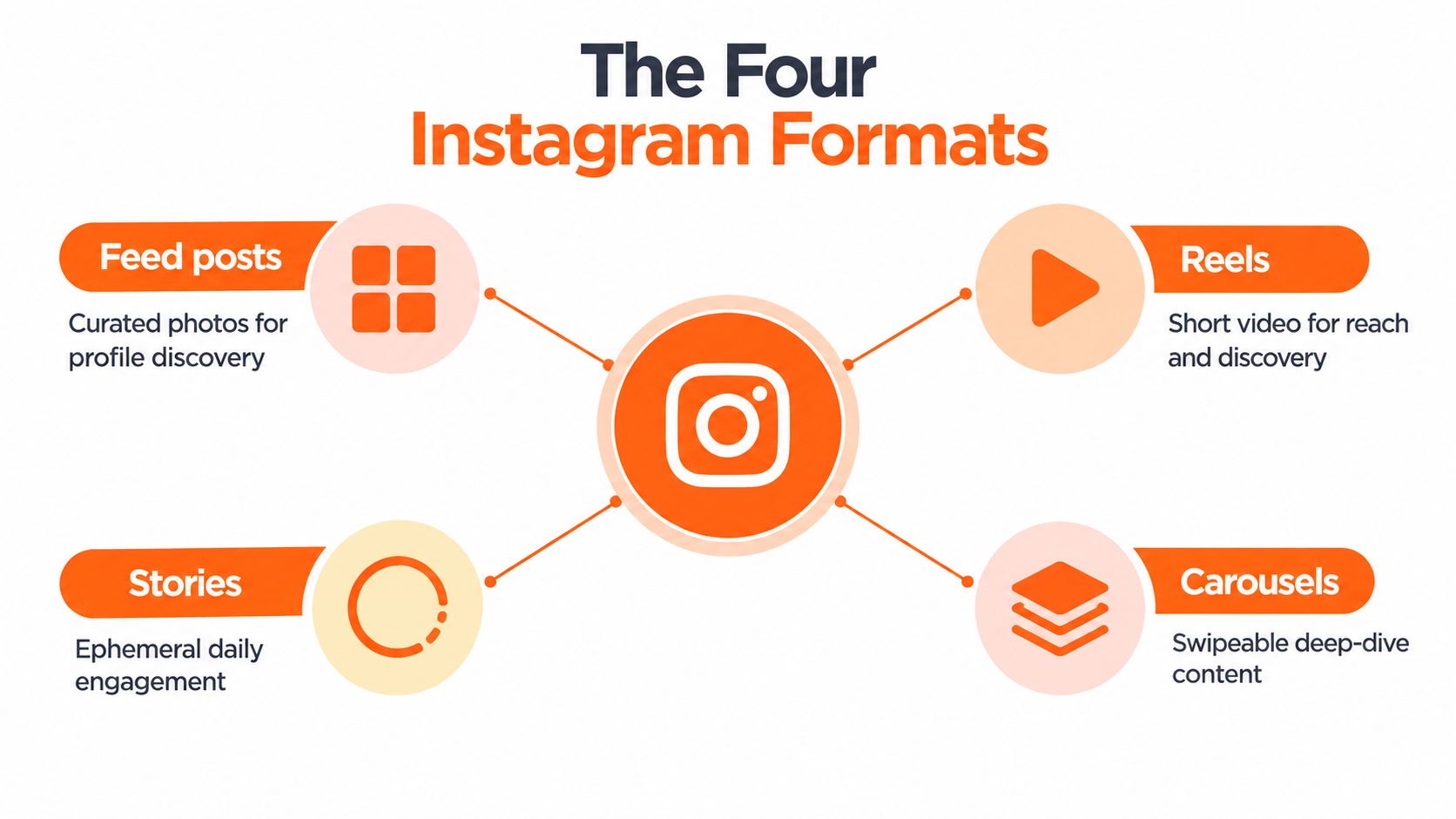
A Feed post is like a magazine page: a considered image or piece of writing that gives someone a reason to pause and a profile visitor a sense of what you publish. It can introduce a point of view, but it shouldn't carry the whole burden of explaining a complex idea.
A Reel behaves more like a teaser trailer. It earns attention through motion and an opening that gives people a reason to keep watching. For a writer, that might mean turning one claim from an essay into a short spoken explanation rather than trying to read the whole article aloud. Watch behavior is a more useful signal for video than a like count alone.
A Story is closer to a hallway conversation. It's informal, immediate, and useful for inviting a response, sharing a quick update, or directing interested viewers toward a link. Replies and link taps help show whether the conversation is leading somewhere.
Then there's the carousel, the slide deck of the Instagram feed. It lets a reader move through a sequence: the problem, the explanation, an example, and a takeaway. If someone saves or shares it, that can signal that the idea is useful beyond the moment they first saw it.
Instagram has separate ranking systems for Feed, Stories, Reels, and Explore, and its explanation of how Instagram ranking works describes predictions about actions such as time spent, comments, likes, shares, and profile visits. That's why I don't judge every format by the same standard. A Reel can hold attention; a carousel can be worth saving; a Story can prompt a reply.
For a closer look at choosing between video and static publishing, compare Instagram Reels and posts.
Quick test: Before you schedule, ask whether your idea is best heard, watched, replied to, or saved. That answer points you toward its format.
A Weekly Posting Rhythm You Can Keep
A calendar full of scheduled posts looks reassuring until Wednesday arrives with unfinished captions and unanswered comments. I'd rather leave space for both than spend the week catching up. My most useful calendar gives creation, publishing, and replies their own place, so Instagram doesn't swallow the time I need for the longer work that feeds it.
Batch first, then leave room to respond
I'd begin with one creation session, with the newsletter draft or article open beside the calendar. Choose a useful point, prepare the Instagram assets, and write their captions while the context is fresh. Check each format before adding it to the queue. That saves me from reopening the same draft every morning just to remember what I wanted to say.
Leave breathing room in the queue.
I schedule pieces that can stand on their own and keep conversation-dependent posts flexible. Publishing integrations require an approved Meta developer app and a professional Instagram account; before building an automated workflow around the stated daily allowance of 50 posts per account across Feed, Stories, and Reels, check the current Instagram platform documentation. A shared allowance matters for high-volume queues, but it shouldn't become a posting target.
I also batch Substack Notes during the same session. Substack supports scheduling Notes on web and mobile, editing them in drafts before publication, and scheduling in the writer's local time zone. Preparing both channels together keeps Instagram in its discovery role: a way into the ideas I publish elsewhere, with room for its own conversations.
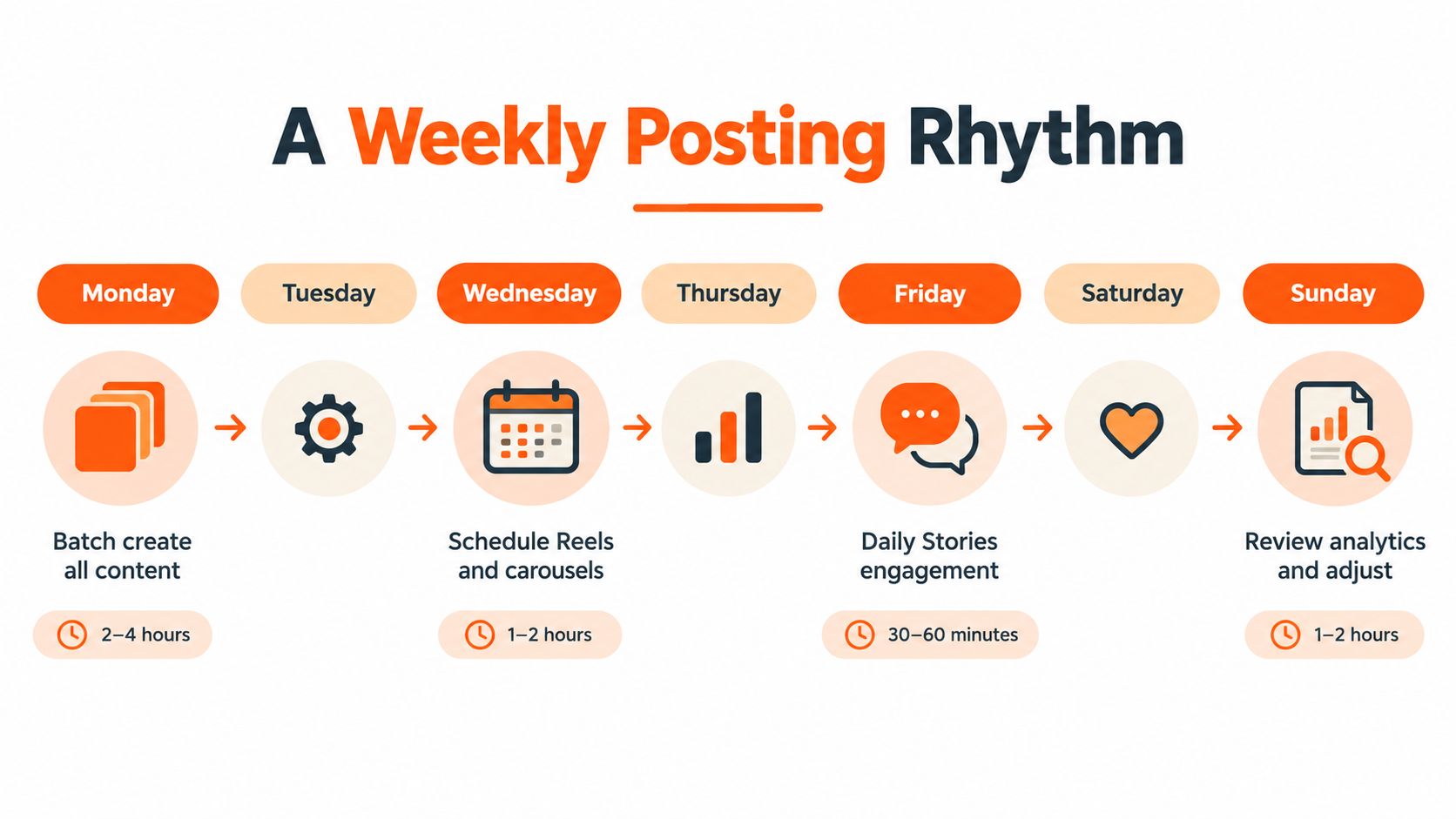
Here's a weekly rhythm I'd use as a starting point:
| Day | A manageable focus |
|---|---|
| Monday | Gather one core idea and batch-create its assets |
| Tuesday | Draft and schedule a Substack Note; check captions |
| Wednesday | Schedule a Reel and carousel |
| Thursday | Reply to comments and adjust upcoming posts if needed |
| Friday | Share Stories and invite a conversation |
| Saturday | Stay available for replies without forcing a new post |
| Sunday | Review the week's signals and note what to test next |
For the publishing slots, use audience activity to choose when to post on Instagram.
Sunday's review should change the next calendar. If an asset takes too long to produce, reduce the workload. If a post starts a useful conversation, leave time to answer it. Scheduling, distribution, and review belong in the same weekly routine; empty slots give that routine room to hold up.
Repurposing One Idea Into a Week of Instagram Content
A strong newsletter essay can feel like a relief when it's finished, followed immediately by the question of how to get it in front of anyone. I found it more useful to treat a finished piece as raw material than to begin another week with a blank content document.
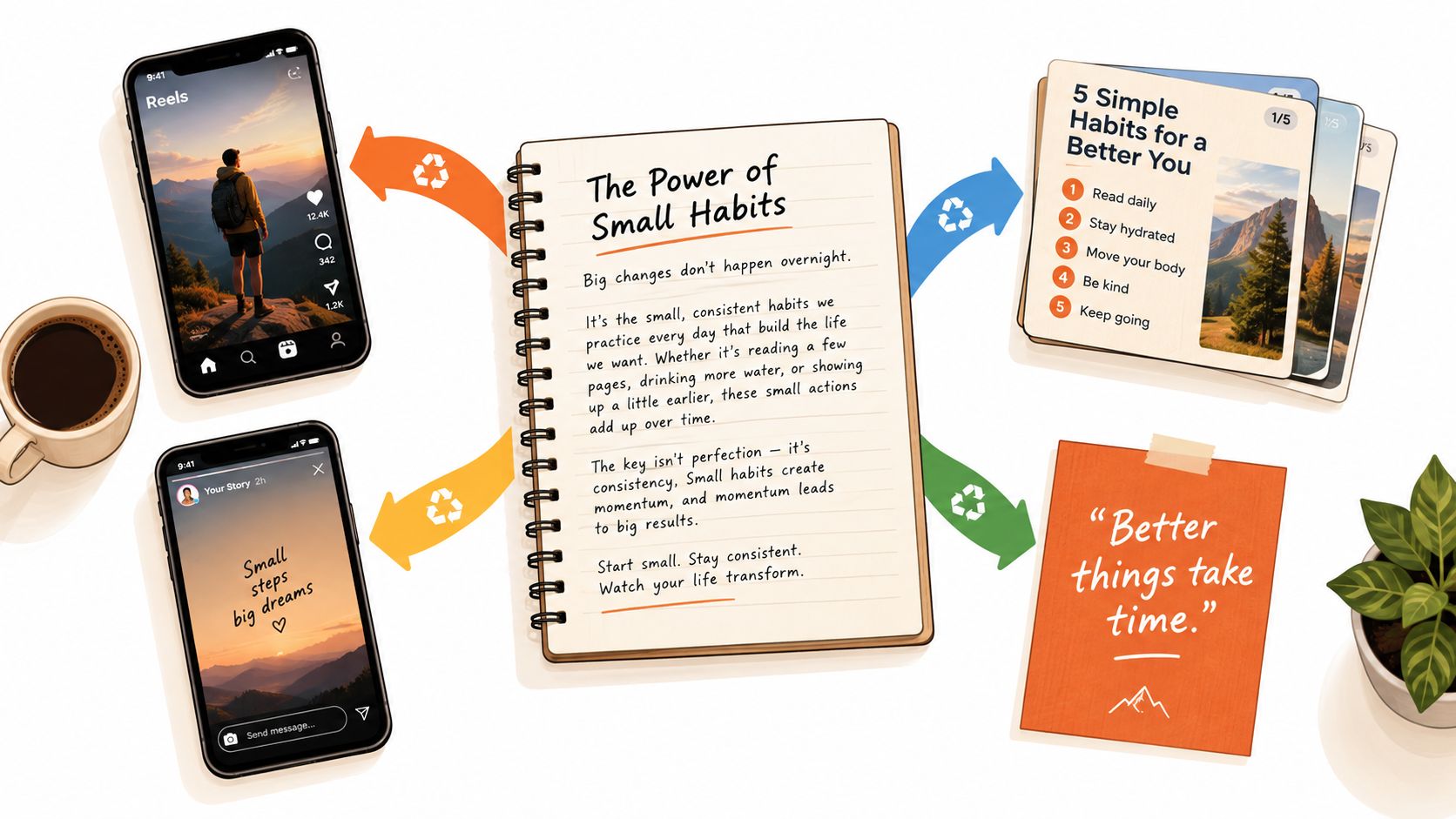
Say I've written a Substack essay about why a creator's daily posting habit feels unsustainable. I can choose one useful argument, such as the difference between publishing regularly and learning from what I publish. That point becomes the source, not a script I copy word for word into every format.
The Reel is a short explanation of the argument, with a clear opening and a natural link back to the longer essay. The carousel can unpack the reasoning across slides, giving readers a structure they can save. A Story can ask whether people feel more stuck on ideas or time, then invite replies. A quote card can highlight one memorable sentence, provided it makes sense without the full essay beside it.
Think of the source piece as a film. The Reel is its trailer, the Story is a behind-the-scenes conversation, and the quote card is its poster. Each one should work on its own, even though it points back to the same larger work. For more examples of adapting material to the platform, this guide to repurpose Instagram content can help you think through format choices.
Let Notes help surface the idea
Substack Notes can also give an idea a short-form life before or after the article appears. Notes are distributed in a feed and can reach people outside an existing subscriber list through discovery and sharing. Substack provides post-level data that can include reactions, clicks, shares, follows, and subscriptions attributed to a Note. That gives me a reason to compare a question, a short excerpt, or a link-focused Note by what it prompted, rather than by visible likes alone.
A simple excerpt-to-post method keeps repurposing focused:
- Choose one claim: Pull out a point that can stand on its own.
- Match the format: Decide whether it needs motion, a sequence, a conversation, or a single visual.
- Make it native: Rewrite the opening and presentation for Instagram instead of pasting in the article's wording.
- Connect the next step: Give people a clear path to the full newsletter, article, or conversation.
The important skill is not squeezing an entire essay into a caption. It's finding several honest entry points into the same useful idea.
Here's a short visual walkthrough to complement that approach:
You can also repurpose content for social media by starting with the strongest argument, then reshaping it for each destination.
Metrics That Matter and the Ones That Lie to You
A post can collect likes and still fail to bring the right people closer to your work. I've learned to treat public engagement as a clue, not a verdict. For a writer using Instagram to introduce deeper work, the more useful question is what someone did after the post caught their attention.
The signals depend on the format. A Reel needs to hold attention. A carousel should offer something worth saving or sharing. A Story can start a conversation or move someone toward a link. If the post is meant to help new people find your work, profile visits and follows can reveal whether that introduction made them curious enough to take another step.
Read the next action, not just the visible reaction
Instagram's ranking systems use different predicted actions across surfaces. Its description of Feed and Explore signals highlights actions including spending time, commenting, liking, sharing, and opening a profile. The practical takeaway is to compare a post with the outcome it was designed to produce, not to rank every format on one universal like count.
I especially watch for the difference between attention and intent. A post might travel widely without leading anyone toward a newsletter, while a smaller post may prompt people to share it with someone who needs the idea. A useful review connects the post's purpose to downstream actions such as profile visits, follows, link clicks, replies, and email sign-ups.
| Format | Primary Signal | Secondary Signal | Outcome It Predicts |
|---|---|---|---|
| Reel | Watch behavior | Shares | Whether the idea holds attention and travels |
| Carousel | Saves | Shares | Whether readers find the explanation useful |
| Stories | Replies or link taps | Completion | Whether viewers respond or follow a path |
| Feed post | Profile visits | Shares | Whether the post builds discovery and interest |
I keep a compact scorecard rather than trying to interpret every dashboard number at once:
- Purpose: What action did I want this post to earn?
- Format signal: Did people watch, save, share, reply, or tap?
- Next step: Did the post lead to a profile visit, follow, or newsletter action?
- Learning: What would I adapt if I made this idea again?
For a writer's workflow, it helps to have a starting point for free Instagram analytics options. The tool matters less than recording comparable signals and reviewing the pattern over time. If you want to strengthen the audience response side of your process, this guide to increasing engagement on Instagram offers further ideas.
The signal I trust most is not a flattering number by itself. It's evidence that a person moved from discovery toward a relationship with the work.
Manual Posting vs Schedulers vs Distribution-First Tools
I used to publish manually because opening Instagram felt simpler than setting up a system. It was simple until I had to interrupt writing to prepare each post, remember every draft, and switch between platforms to publish the same underlying idea in different forms. A scheduler can remove some of that friction, but it won't automatically solve the bigger problem of connecting Instagram to the rest of a writer's publishing workflow.
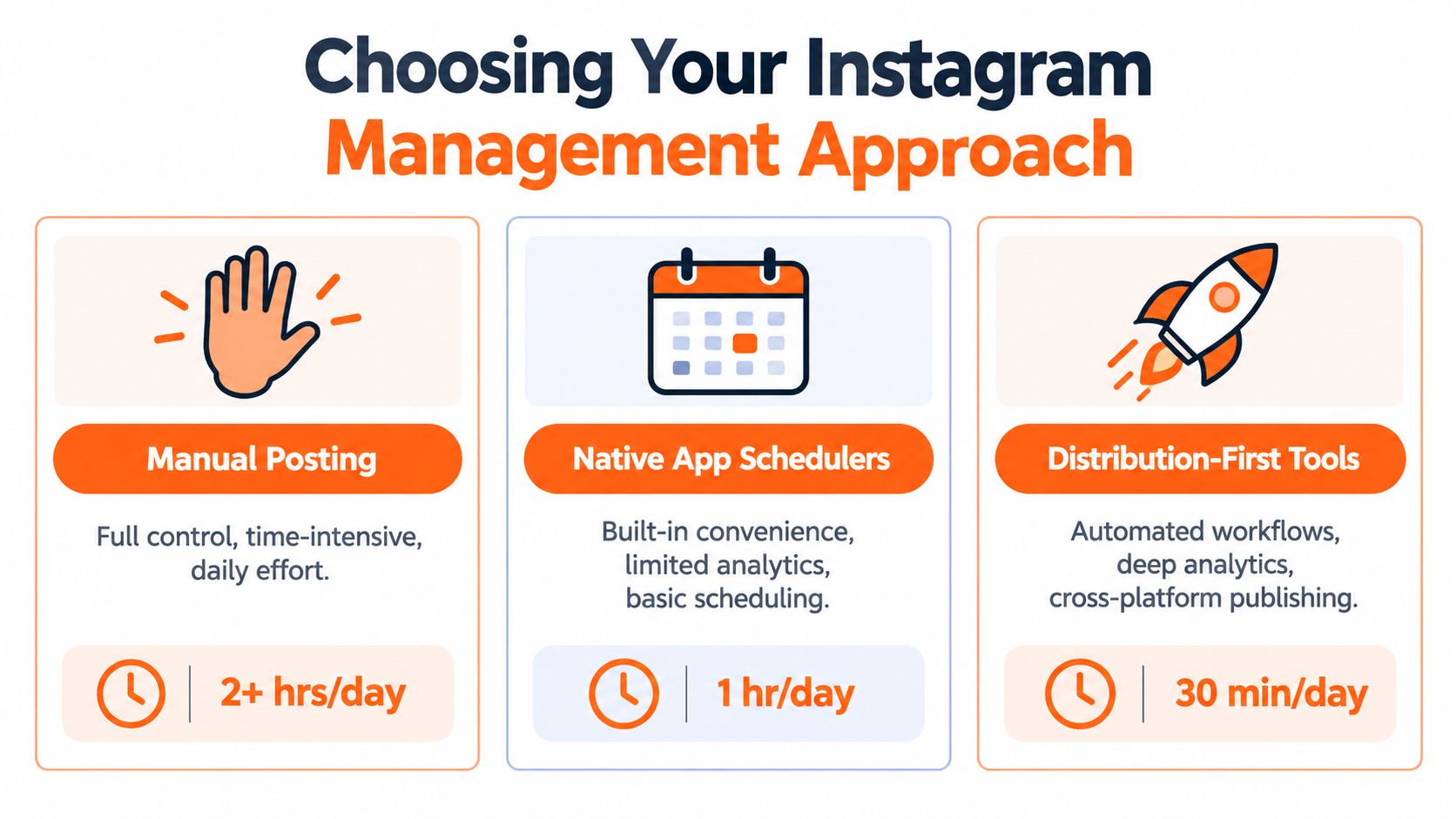
Choose the operating model before the next subscription
Manual posting gives you direct control and makes it easy to make a last-minute change. The cost is attention: every post pulls you back into the app, and cross-posting can become repeated copying and pasting. It may work when you publish occasionally or want to stay fully hands-on.
Native schedulers are a sensible next step when you mostly need to plan Instagram content ahead of time. They can reduce the pressure to publish in the moment, but scheduling alone doesn't tell you which idea should become a newsletter Note, LinkedIn post, or X thread.
A distribution-first tool is designed around the movement of ideas across destinations. For a writer, that can mean preparing an Instagram asset from a longer piece, scheduling other platform versions, and checking whether the content contributed to audience growth. Narrareach, for example, supports Instagram post creation from articles, including images and five-slide carousels for review, scheduling Instagram posts with uploaded creative, and distributing content across platforms such as Substack, Medium, LinkedIn, and X. Its product is one option for consolidating those writer-focused tasks, alongside whatever native tools a creator already prefers.
| Approach | Time and control | Cross-platform reach | Best fit |
|---|---|---|---|
| Manual posting | Direct control, but repeated hands-on work | Usually requires separate publishing steps | Occasional posts and close live involvement |
| Native schedulers | Easier advance planning, platform-specific workflow | Depends on supported destinations | Creators focused mainly on Instagram |
| Distribution-first tools | Built for linked publishing and reuse | Connects ideas across multiple platforms | Writers distributing long-form work in several formats |
My preference is a hybrid: use Substack's native Notes scheduling when that fits the writing workflow, then choose a distribution system for the versions that need to reach multiple platforms. Before adding a tool, consider what you publish, where the audience needs to find it, and how much of the process you want to handle by hand. This guide to automating Instagram posts can help you weigh the workflow trade-offs.
Your 30-Day Instagram Workflow and What to Do Next
On Monday, start with a newsletter you've already published. Pull out the claim you'd want someone to remember, then draft a carousel around it. Before opening the scheduler, write down where an interested reader should go next. I find that decision more useful than filling another empty calendar slot.
Instagram introduces the idea. Substack, Ghost, Beehiiv, LinkedIn, or X can give it room to develop and give readers somewhere to continue the conversation. Scheduling, repurposing, and reviewing results belong in that same loop.
Keep DataReportal's Instagram statistics as background context. For this month's publishing decisions, focus on whether each post has a clear job and a useful next step.
A checklist you can put to work
Use the opening week to carry one existing idea through this checklist. Keep the scope small enough that you can finish it alongside your writing.
- Choose the idea: Pick a useful claim from an article, newsletter, or recurring audience question. Keep the original piece handy so each version stays grounded.
- Create native versions: Choose a Reel, carousel, or Story that suits the point. Adapt the opening and presentation for each destination.
- Batch and schedule: Prepare the assets together, then schedule Instagram posts and Substack Notes wherever your tools support it. Leave room to respond after publication.
- Invite a response: Give readers a specific next step: reply, visit your profile, or read the longer piece. Check that the destination matches the invitation.
- Review outcomes: Compare audience actions with the post's intended purpose. Record what you would keep or change before preparing another version.
- Repurpose what connects: Carry a promising idea to LinkedIn or X, adapting it to the conversation there.
For the remaining weeks, repeat the loop with another piece of work and apply what you learned. If a carousel attracts questions, those questions can shape the next newsletter. If readers reach your profile but stop there, check the invitation and destination before producing more assets.
At the end of the 30 days, I'd keep the steps that helped the work travel and simplify anything that made publishing harder.
To try a connected workflow, explore Narrareach for repurposing, scheduling, and cross-platform publishing. Or save this checklist and run it with your next newsletter. Start with work you already have.