
10 LinkedIn Content Ideas for Writers and Creators
Your finished draft is strong, but LinkedIn gives it a few likes and then forgets it. Your newsletter issue reaches existing subscribers while the people who'd benefit from it never see it. A post disappears within hours, leaving you with no clear answer about whether the problem was the idea, the format, the hook, or the timing.
That makes publishing feel like guesswork. You create something useful, distribute it once, and move on before you've learned what your audience wants.
This guide turns 10 LinkedIn content ideas into a practical testing system. Each idea includes a four-week experiment, one primary metric, and a sample angle. The formats sit inside five clusters: voice and trust, teaching formats, engagement research, distribution, and proof. You'll test stories, opinions, how-to posts, carousels, polls, newsletter teasers, repurposed winners, metrics updates, case studies, and short video.
LinkedIn evolved from a professional directory into a global publishing environment. It reached 100 million members in 2011, 300 million in 2014, and 500 million in 2017, according to LinkedIn's historical timeline. Your best ideas don't need to stay local, but they do need to be clear enough for people outside your immediate network.
Narrareach is one option for reducing the manual work. It can help schedule and track content across platforms, but the strategy still starts with a useful idea and a measurable test. For more background on building shareable content, see this step-by-step viral content guide.
1. Personal Story Lesson Post
Advice is easy to scroll past when it sounds interchangeable. A personal story gives the advice a source, a setting, and a consequence. The strongest version starts with one specific moment, shows the mistake or turning point, and ends with a lesson another professional can use.
For four weeks, publish one story post each week. Compare it with your usual advice posts using saves, comments, and profile visits. Likes can show that the post was noticed. Saves and profile visits tell you whether the story created enough value or curiosity to support a relationship.
A founder might write about a failed launch and the metric they now check first. A newsletter writer might explain how a supposedly boring issue generated more replies after changing one editorial decision. The event doesn't need to be dramatic. A missed deadline, awkward client call, rejected pitch, or small workflow change can create a useful post if the lesson is precise.
Build the post around one moment
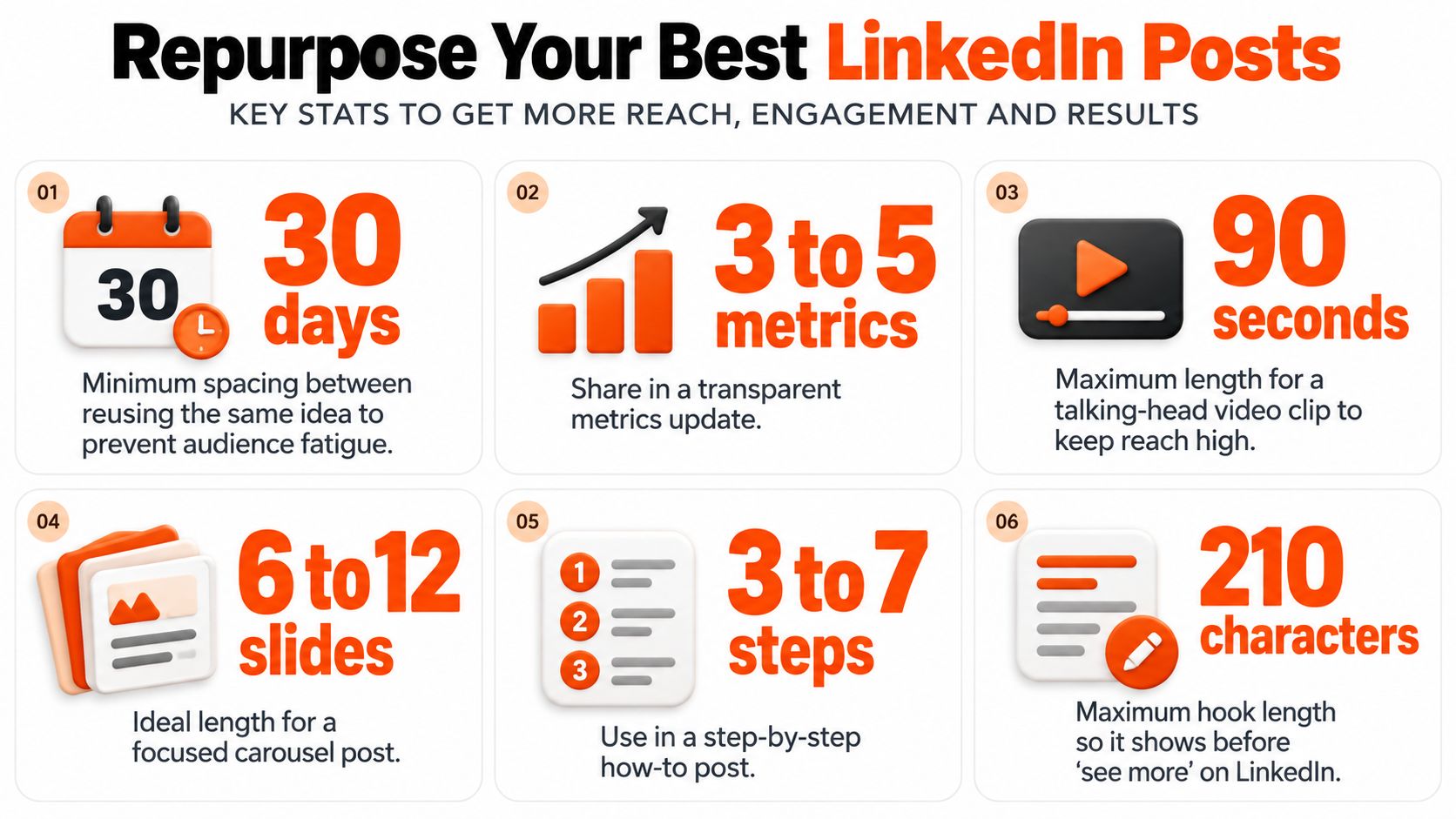
Keep the opening under 210 characters so the first idea appears before “see more.” Name a concrete detail, such as a number of days, subscribers, dollars, or a percentage from your own work. Don't add numbers for decoration. Use them to make the situation verifiable.
Keep a running note with 20 small experiences. That list prevents you from waiting for a major career event before publishing something personal. Close with a question that invites a real response, such as “What metric do you check first after a launch?”
Practical rule: Don't turn the story into a diary entry. The reader should understand what happened, why it mattered, and what they can do differently.
Your four-week result should answer one question: do personal experiences generate more meaningful actions than generic advice for your audience? If profile visits rise but saves stay flat, the story may be creating curiosity without enough practical value. If saves rise, turn the lesson into a how-to or carousel next.
2. Contrarian Take and Myth-Busting Post
Your audience has seen the same advice repeatedly. “Post daily” and “use more hashtags” are familiar claims, so repeating them rarely creates a strong reason to stop. A contrarian post works when it challenges a belief and then earns the challenge with evidence.
Choose one industry myth and publish an evidence-backed rebuttal for three weeks. Track comment volume against your normal post baseline. Don't treat disagreement as failure. A thoughtful objection can reveal that the topic matters, while an empty argument may signal that the claim was too broad.
A newsletter writer could argue that better hooks matter more than publishing more often, using their own post results as evidence. A B2B marketer could challenge the assumption that gated content always performs better than freely available guidance. In both cases, the post needs a narrow claim, not a general attack on the industry.
Make disagreement useful
Use a simple structure:
- Name the belief: State the advice your audience already recognizes.
- State your counterclaim: Explain what you believe instead.
- Show evidence: Include one number from your own results or a clearly sourced observation.
- Acknowledge the exception: Explain when the common advice might still work.
- Invite a specific response: Ask what others have observed, not whether they “agree.”
Reply to the first 10 comments within an hour when you can. Even more so, answer the strongest counterargument instead of only rewarding people who support you. That exchange often produces a better follow-up post than the original claim.
This format fails when the writer confuses contrarian with provocative. A hot take without evidence may produce comments, but it won't necessarily build authority. Your four-week test should compare comment quality, not only comment quantity. Record whether replies include examples, objections, questions, or buying intent.
3. Step-by-Step How-To Post
You probably know a process that feels obvious because you use it every week. Your reader doesn't see the invisible decisions inside it. A step-by-step post exposes those decisions and gives the reader a sequence they can follow immediately.
For four weeks, publish the same type of how-to post on Monday and Thursday. Track saves and profile clicks. The repeated format lets you compare different topics without changing the entire publishing system.
A writer could explain how they turn one article into 10 social posts. A marketing lead could outline a newsletter launch process completed in 14 days. The subject can be narrow. Narrow subjects are often more useful because the reader can recognize the starting point and the desired result.
Write for action, not completeness
Keep each step to one or two sentences. Add one concrete example to each step, and use numbered lines or visual spacing so the process is easy to scan. A downloadable checklist can turn interest into a lead, but the post must remain useful without the download.
If you're publishing across LinkedIn and Substack, you can also use this guide to scheduling LinkedIn posts to remove some of the repetitive work.
The visual should support the process rather than repeat the text. A reader should understand the sequence from the post, then use the image as a reference.
A useful four-week experiment changes the process, not just the wording. Test a research workflow one week, an editing workflow the next, then a distribution workflow. If saves increase but profile clicks don't, the post may be useful without creating enough interest in your broader work. If both rise, develop the process into a longer article or document.
4. Carousel PDF Post
A framework can lose its shape inside a long text post. A carousel gives each stage its own slide, so readers can follow the argument without decoding a dense paragraph.
Run four carousels over four weeks. Track swipe-through behavior and saves as the primary metrics, then compare them with text posts. A strong carousel answers one reader question quickly. It does not cram every related idea into a presentation.
For example, a writer could build a 10-slide framework for turning one article into a month of posts. Another could create a 7-slide breakdown of a newsletter growth experiment. Editorial workflows, distribution maps, publishing checklists, and lessons from consistent writing also fit the format.

Build the argument slide by slide
Give each slide one job. Keep copy between 20 and 30 words where possible. Open with a question or bold claim rather than a label such as “My Content Framework,” and place the call to action on the final slide. Check the export on a phone before publishing.
Use this sequence:
- Problem: Name the decision or frustration.
- Evidence: Show what supports the argument.
- Framework: Present the method.
- Example: Demonstrate the method in practice.
- Action: Give the reader one next step.
Use this guide to posting a carousel on LinkedIn before publishing. The 2025 Socialinsider benchmark reported a 5.00% average engagement rate by impressions, compared with 6.60% for multi-image posts and 5.85% for native documents. The LinkedIn benchmark reference supports testing structured visual content, while engagement alone cannot show subscriber intent.
Log profile visits, qualified comments, link clicks, and subscriptions beside swipe-throughs and saves. After four weeks, keep the format if it earns both attention and meaningful action. If saves rise without subscriptions, improve the final slide and the path to your broader work.
5. Native Poll and Question Post
You want audience research, but an open question often asks too much work from the reader. A poll reduces the first action to one choice. That gives you a faster signal about what your audience wants to read, debate, or buy.
Run one poll per week for four weeks. Track votes and comments, then compare the winning topics with the subjects you planned to publish. A writer might ask whether readers prefer short or long newsletter issues. A B2B lead might ask which format a team wants next, such as a teardown, checklist, or case study.
Add two or three sentences of context. Explain why you're asking and what you'll do with the result. Keep the poll open for three to seven days so people have time to participate without letting the topic become stale.
Turn research into publishing
Reply to comments that explain the vote. Those replies contain more useful information than the vote itself because they reveal the reasoning behind the choice. If readers select “short issues” because they lack time, the genuine content opportunity may be better structure, not just fewer words.
A MarketingTechNews summary of Metricool's 2025 LinkedIn data reported that polls achieved 206% above-average reach while appearing in only 0.00034% of analyzed LinkedIn publications. Treat that as a reason to test polls, not a promise that every poll will outperform your usual content.
Publish the winning option as a full article within one week. Then create a follow-up post that explains what the responses changed in your thinking. A poll without a follow-up collects attention and wastes the research.
Your four-week metric is not just votes. Track whether poll participation leads to comments, profile visits, article reads, and subscriptions. A large vote count with no downstream action may indicate curiosity rather than demand.
6. Substack Newsletter Teaser Post
Your best newsletter issue may be reaching only the people already subscribed. LinkedIn gives you access to professionals who may care about the idea but haven't encountered your publication. A teaser bridges those audiences by extracting one complete insight from the issue.
For four weeks, pair every Substack issue with one LinkedIn teaser. Track link clicks and new subscribers. Publish the teaser within 24 hours of the newsletter so the topic remains current and your writing session stays connected to distribution.
The teaser should stand on its own. Pull out one framework, decision, or story. Don't write “new issue out now” and expect the link to do the work. A product writer might share one framework from Monday's newsletter. A Substack operator might publish a short story from a recent issue and explain the lesson before inviting readers to subscribe.
Make the click optional
Place the newsletter link in the first comment if that fits your distribution approach, but don't hide the value behind the click. The post should teach something even when the reader never opens Substack.
Use this workflow for cross-posting Substack content to LinkedIn to adapt the hook for a professional feed instead of copying the newsletter introduction. Track which subjects generate subscribers, not merely which subjects create clicks.
LinkedIn says prospects engage with 10 pieces of content before making a purchase decision, according to its content marketing tactical plan. For a newsletter creator, that supports a sequence rather than a one-off promotion. One issue can become a teaser, a practical example, an objection post, a document, and a final invitation.
Your four-week review should identify the topics that attract qualified subscribers. If clicks rise but subscriptions don't, the promise in the LinkedIn post may not match the landing page. If both rise, build a repeatable teaser structure around that topic.
7. Repurposed Top-Performer Post
Useful ideas often sit buried in your archive while you create new posts. A strong post from several months ago can earn another run when you change the hook, update the evidence, or adapt it to a different format.
Select your top three posts from the last six months. Rewrite each with a new opening and refreshed examples, then publish the versions four weeks apart. Track one primary metric for each test, such as saves, comments, profile visits, or subscriber actions, and compare the result with the original post.
A creator might turn a hiring post into a carousel with current examples. A writer could adapt a popular Medium story into a LinkedIn post and an X thread. The core idea stays familiar to its author, but newer followers may never have encountered it.
Change the asset, not only the date
Wait at least 30 days before reusing the same idea. Replace the first line completely. Check every statistic and update any example whose industry context has changed. Turn a personal story into a practical framework, or reshape a list into an explanation of the most common failure.
Use this repurposing workflow for LinkedIn to create platform-specific versions instead of copying the original post unchanged.
LinkedIn developed from a networking service into a global publishing environment, with members connected across more than 200 countries by 2017. That makes durable expertise worth revisiting. A useful idea does not become irrelevant because you published it once.
Treat the rewrite as a four-week experiment. Keep the topic stable while changing one major variable, such as the opening, format, or example. Record whether the new hook improves comments, whether the carousel increases saves, or whether the updated example generates more profile visits. At the end of the test, retain the format change that produced the strongest downstream action and document what you will test next.
8. Behind-the-Scenes Metrics Update
A monthly metrics update turns publishing decisions into evidence readers can inspect. It also exposes weak assumptions. Run this as a four-week experiment, then repeat the format for three months if the reporting itself earns replies or subscribers.
Choose one fixed scorecard: subscriber growth, top post, average engagement, and one lesson. Add the relevant LinkedIn engagement metrics when LinkedIn is part of your distribution. Keep the definitions unchanged across the test. A stable scorecard makes month-to-month comparisons more useful than a larger list of flattering figures.
Start with the decision, not the dashboard. A newsletter writer might show which issue generated the most sign-ups and explain what changed in its subject line or promotion. A startup marketing lead could identify the channel that produced the strongest response, then name the activity they stopped. Include a failed test. A report containing only wins reads like advertising.
Report the choice behind the metric
Use a compact monthly record:
- Baseline: State where the period began.
- Change: Identify what you published or altered.
- Result: Report the selected outcome.
- Lesson: Explain what you will repeat or stop.
- Next test: Name one variable for the following four weeks.
Track one named metric as the experiment's primary measure, such as subscriber growth for a newsletter or replies for a LinkedIn update. Use the other figures as context. This prevents a strong engagement rate from hiding flat subscription growth.
An analytics screenshot can support the claim. Remove private subscriber information and sensitive client details, and crop unrelated dashboard panels. Readers need enough context to understand the decision, not every available chart.
Research cited by LBBonline associates effective thought leadership with strong research, clear business context, and practical guidance. Apply those standards at a personal scale. Explain the evidence, the choice it informed, and what the next test will change.
Substack's documentation covers scheduled Notes and dashboard reporting across subscriber growth, retention, email performance, post engagement, traffic sources, and revenue, with CSV export available through Substack's product documentation. Use those records alongside LinkedIn results to identify whether attention became a measurable audience action.
9. Client or Reader Result Case Study Post
General advice is hard to assess without a real starting point. A case study shows who changed, what they changed, and which result followed.
Run a four-week experiment with one reader or client result. Track inquiries as the primary metric and profile visits as supporting context. Compare both with your average post performance. Get written permission before naming a client or showing identifiable analytics.
Use this structure:
- Baseline: Describe the audience, workflow, or problem at the start.
- Action: Explain the change and the reason for it.
- Result: Report the measurable outcome.
- Condition: State the timeframe and relevant context.
- Lesson: Show what another reader can apply.
A writer could document subscriber growth from 200 to 1,400 over 90 days, provided the records are accurate and permission covers the disclosure. An agency could show how a client changed its repurposing workflow, then report what happened afterward. Present the outcome as evidence from one situation, not a promise for every audience.
Make the evidence understandable
Put the baseline before the result. Readers need that reference point to judge the change. Add a screenshot when permission allows, label the metric, and remove private subscriber or client information. A graph without labels creates the appearance of proof without explaining what changed.
Research associated with the Edelman-LinkedIn report suggests that thought leadership is stronger when it includes sound research, business context, and practical guidance. Apply that standard at a personal scale. Explain the evidence, the decision it informed, and what the next test will change.
Your four-week LinkedIn test should connect content to a business signal. If profile visits rise while inquiries stay flat, the case study may attract attention without showing readers how to act. Include the decisions behind the result, then invite a specific question about the process. Track replies as a secondary signal if the post aims to start a discussion.
10. Short Video or Talking-Head Clip
A useful idea can earn attention in text, while a short video lets readers recognize your voice and face. Start with a phone, stable mount, natural light, and one focused point. Studio production is unnecessary.
Run a four-week test: publish one video per week, keep each clip under 90 seconds, and add captions. Track profile visits as the primary metric, with reach as a secondary measure. Compare those results with your text posts. A founder might explain one hiring mistake in 60 seconds. A newsletter writer could share three editing lessons while showing a text summary for viewers who prefer reading.
Use a flexible script rather than repeating the same format every time:
- State the problem in the opening sentence.
- Give brief context from a real situation.
- Offer one practical change.
- Demonstrate the change with an example.
- End with a specific question.
Record a written version of the same idea and publish it separately when the topic suits both formats. Keeping the subject constant makes the comparison cleaner. The trade-off is production time: two posts require more work, but they reveal whether your audience responds better to watching or reading.
LinkedIn has heavy content competition. Hootsuite's compiled data says members engage with approximately 1.5 million pieces of content every minute, while LinkedIn reports more than 1.3 billion members across 200 countries and regions. Those figures explain the distribution challenge, not the result. A video still needs a clear opening and a reason to keep watching.
For production ideas, see this guide to creating LinkedIn videos with AI. Review profile visits separately from views. Reach shows distribution; profile visits indicate whether viewers wanted to learn more about the creator.
10 LinkedIn Content Ideas Comparison
| Format | Implementation (🔄) | Resources (⚡) | Expected outcomes (⭐ 📊) | Ideal use cases (💡) | Key advantages |
|---|---|---|---|---|---|
| Personal Story Lesson Post | Moderate, craft specific moment, arc, lesson | Low–Medium, time, notes, vulnerability | ⭐⭐⭐, higher comments, trust, recall | Build personal brand, increase comments & saves | Relatable, memorable, comment-driving |
| Contrarian Take & Myth-Busting Post | Moderate–High, state claim, back with evidence | Low–Medium, data or examples, readiness to defend | ⭐⭐⭐, strong reach & debate; volatile engagement | Stand out, provoke discussion, thought leadership | Sparks debate, positions as independent thinker |
| Step-by-Step How-To Post | Low, outline clear numbered steps | Medium, examples, templates, checklist | ⭐⭐⭐, high saves, establishes expertise | Tutorials, templates, actionable guides | Highly actionable; easy to reuse as assets |
| Carousel (PDF) Post | High, slide planning + design | High, design time, assets, export | ⭐⭐⭐, high dwell time and swipe engagement | Frameworks, multi-step processes, visual teaching | Visual, shareable, great for complex ideas |
| Native Poll & Question Post | Low, draft clear question + options | Low, quick setup, minimal assets | ⭐⭐, fast participation; limited depth | Audience research, topic validation, quick wins | Low friction engagement; clear audience signal |
| Substack Newsletter Teaser Post | Low, extract one strong insight | Low, repurpose existing content | ⭐⭐, drives clicks/subscribers if teased well | Promote longform, convert readers to subscribers | Efficient repurpose; links social to newsletter |
| Repurposed Top-Performer Post | Low, rewrite hook, update data/format | Low, analytics + editing time | ⭐⭐⭐, proven engagement with less ideation | Reuse successful ideas across platforms | Time-saving; leverages proven audience interest |
| Behind-the-Scenes Metrics Update | Moderate, compile metrics + lesson | Medium, analytics screenshots, consistency | ⭐⭐, builds credibility; recurring audience growth | Transparency, benchmarking, serial content | Trust-building; reliable series format |
| Client/Reader Result Case Study Post | High, collect data, get permission, craft narrative | Medium–High, client cooperation, proof assets | ⭐⭐⭐, strongest social proof; attracts qualified leads | Show real outcomes, convert prospects to clients | Compelling proof; drives inquiries and trust |
| Short Video / Talking-Head Clip | Moderate, hook, film, edit, captions | Medium, phone, lighting, editing, captions | ⭐⭐⭐, strong reach and personal connection | Stop the scroll; build recognition and authenticity | Highly personal; repurposable and attention-grabbing |
Run One Experiment This Month
Don't test all 10 formats at once. Choose the one that fits your current workload and your current business objective. If you need trust, start with a personal story or transparent metrics update. If you need saves, test a how-to post or document carousel. If you need audience research, run a poll. If you need subscribers, pair a useful LinkedIn teaser with your newsletter.
Run the format for four weeks. Keep the publishing conditions as consistent as you reasonably can. Use the same primary metric throughout the test, then record supporting actions such as comments, profile visits, link clicks, and subscriptions. Compare the result with your usual posts instead of comparing it with someone else's feed.
The broader benchmark data supports this outcome-based approach. Metricool's 2025 analysis covered 577,180 LinkedIn posts from 47,735 company pages and reported that video impressions increased by 73%, video views by 52%, and post clicks by 31%, as summarized by Social Media Today. Those figures can help you choose a format to test, but they don't tell you whether video will generate subscribers for your audience.
Format comparisons also need context. Socialinsider reported 6.60% engagement by impressions for multi-image posts, 5.85% for native documents, and 5.60% for video, with an overall average of 5.00%, as noted earlier. The useful question isn't “Which format wins everywhere?” It's “Which format helps me reach this month's objective?”
Your publishing system should also preserve the ideas that already work. Substack lets publishers schedule Notes for a selected local time on web, iOS, and Android, edit scheduled Notes from the drafts area, and review subscriber and post performance in the dashboard, according to Substack's product documentation. That creates a practical workflow: write the long-form piece, extract several distinct insights, schedule the Notes, adapt one insight for LinkedIn, and review which version drives the next action.
Narrareach can support that workflow from one dashboard. You can schedule Substack Notes, Medium articles, LinkedIn posts, and X content, then use cross-platform analytics to see which ideas already resonate. It can also help turn one longer piece into platform-specific posts, so you spend less time copying and reformatting and more time improving the idea itself.
Start with a simple log:
- Format: Story, poll, carousel, video, teaser, or another test.
- Topic: The specific problem addressed.
- Primary metric: Saves, comments, profile visits, clicks, or subscriptions.
- Supporting metrics: The actions that explain the result.
- Next move: Repeat, revise, or retire the idea.
If you're ready to reduce the manual work, you can start Narrareach free without a credit card and use it to schedule and distribute the experiment. If you're not ready for another tool, keep the format, metric, and four-week test, then run the process with the tools you already use.
Narrareach helps writers schedule Substack Notes, Medium articles, LinkedIn posts, and X content from one dashboard, while its analytics show which ideas drive meaningful audience actions. Visit Narrareach to start free with no credit card required, or follow along for weekly experiments that turn proven ideas into consistent distribution.